How to Integrate @Intercom Support Messages with Close.io #CRM
Vinay Patankar · 14 Jan, 2016 · Business · Business-process-management · Business-systematization · Sales-and-marketing-standard-operating-procedures · Technology


I have been wanting to sync my support system Intercom with the CRM we use at Process Street - Close.io (which I have written about before).
The reason for this is when we are looking at a customer in the CRM we want to be able to see not only the sales emails but all the support conversations they were having too.
This can be done quite easily with other Help Desk Tools or via the API but I wanted to build something quickly that didn’t require developer time.
I first setup a Zap using Intercom’s “New Message” Zap that triggered an email to my inbox which then Synced using Close’s 2 way email sync, which worked fine but only worked for the first message that was sent, it didn’t track the whole conversation which can last for days and contain lots of valuable information for sales. This basically meant sales still had to open both Intercom and Close.io to get a full picture of the customer.
Integrating All Intercom Support Tickets with Close
Step 1: Create a Webhook Zap in Zapier and get Custom Webhook URL
Create a new Zap in Zapier and add the Webhook integration, click next until you see the custom URL
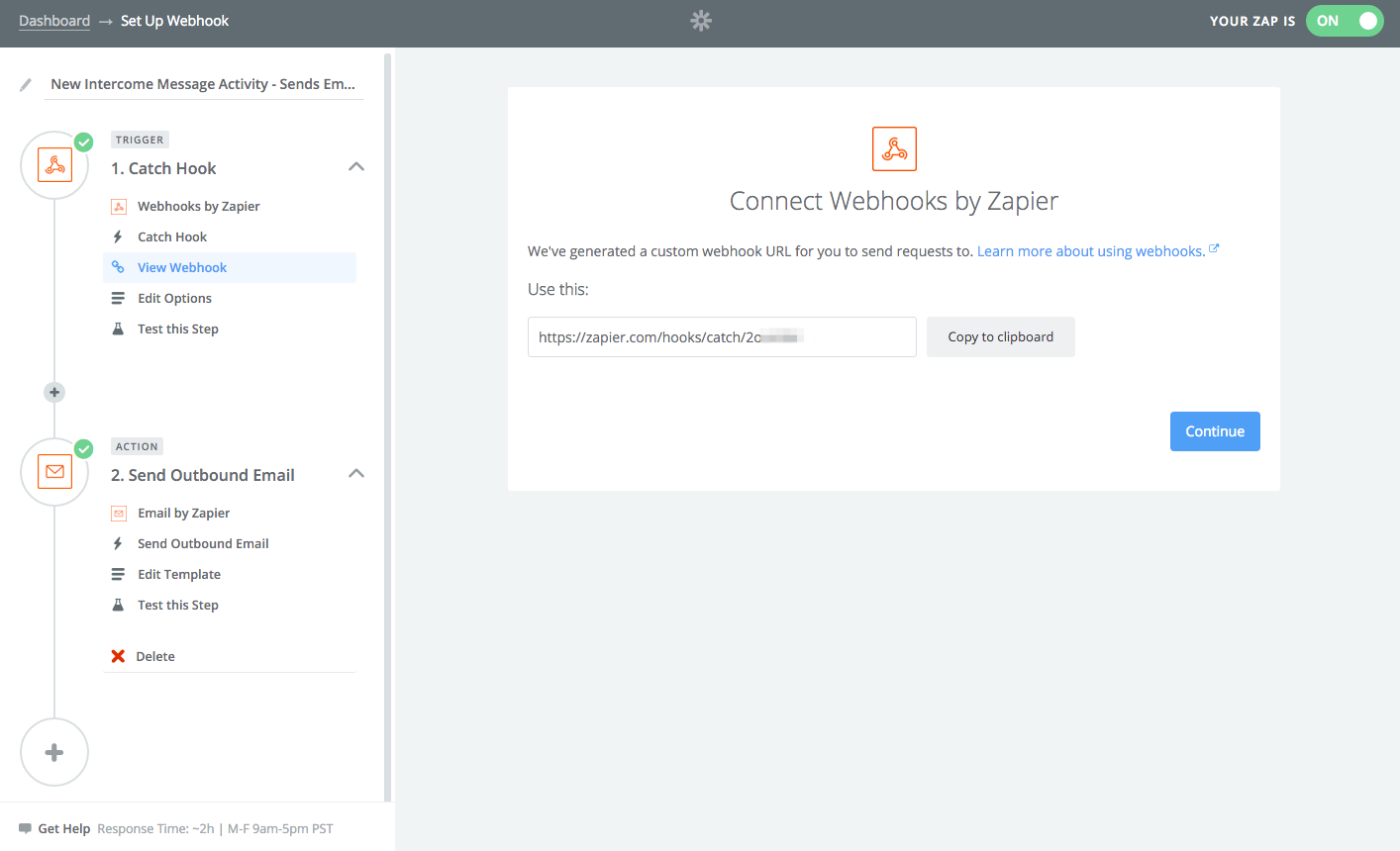
Step 2: Create a Webhook in Intercom
Go to Settings -> Integrations and click “Add Webhook Integration”
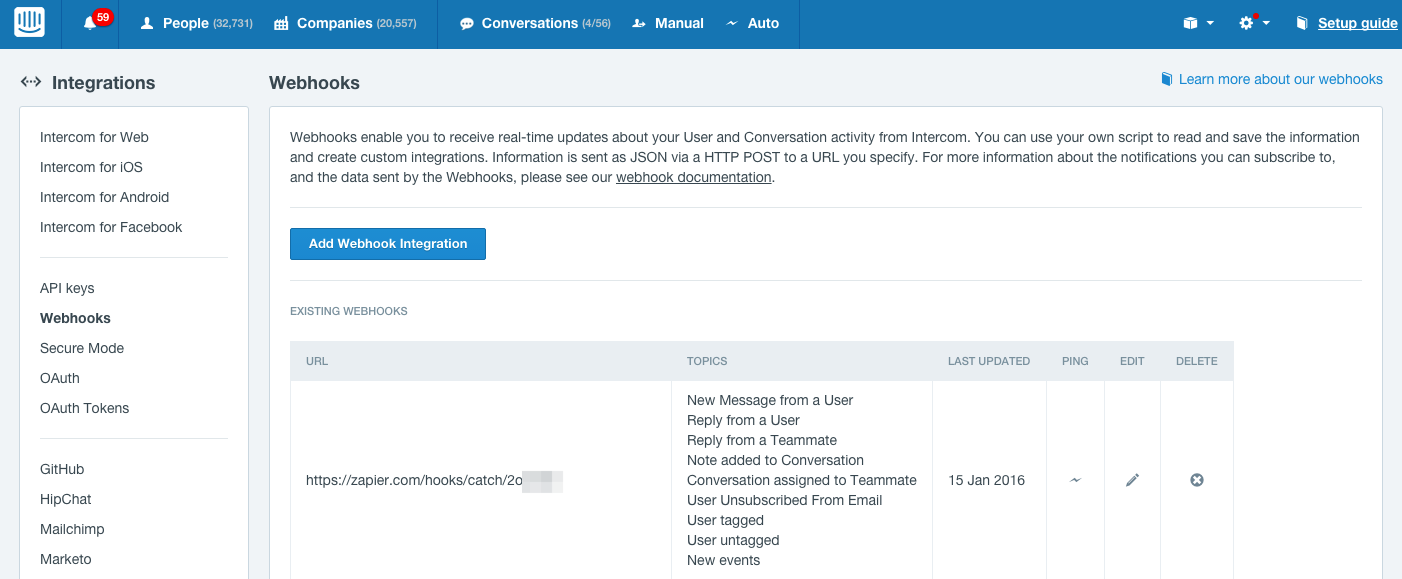
Here are the topics I am passing in the Webhook:
New Message from a User Reply from a User Reply from a Teammate Note added to Conversation Conversation assigned to Teammate User Unsubscribed From Email User tagged User untagged New events
Step 3: Configure rest of Zap in Zapier
Here is a screenshot of my Zap click for full image.
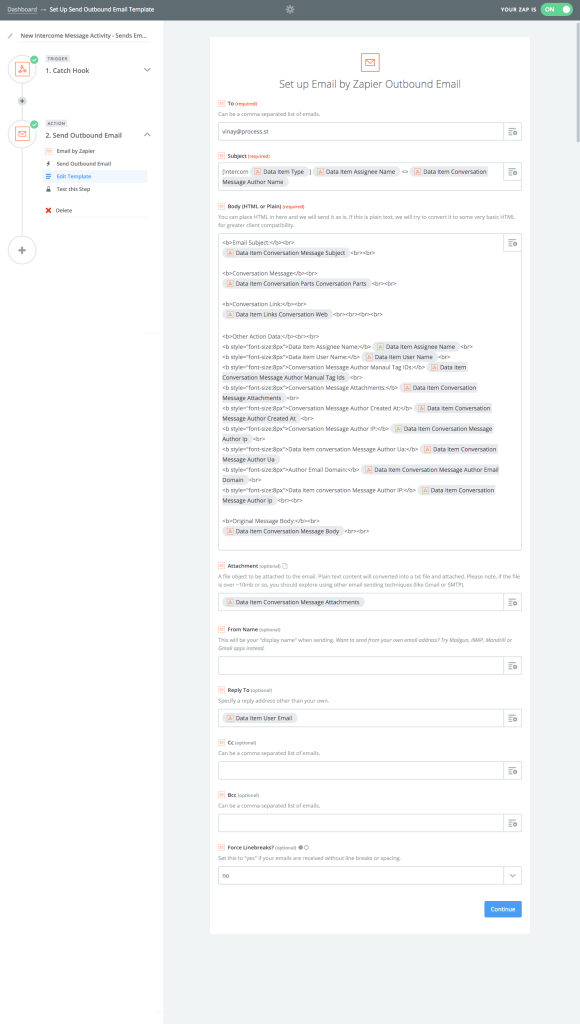
Here is the text export (I assume you need to swap out my ID numbers):
Subject: [Intercom {{6451100__data__item__type}}] {{6451100__data__item__assignee__name}} <> {{6451100__data__item__conversation_message__author__name}}
Body:
Email Subject:
{{6451100__data__item__conversation_message__subject}}
Conversation Message
{{6451100__data__item__conversation_parts__conversation_parts}}
Conversation Link:
{{6451100__data__item__links__conversation_web}}
Other Action Data:
Data Item Assignee Name: {{6451100__data__item__assignee__name}}
Data Item User Name: {{6451100__data__item__user__name}}
Conversation Message Author Manaul Tag IDs: {{6451100__data__item__conversation_message__author__manual_tag_ids}}
Conversation Message Attachments: {{6451100__data__item__conversation_message__attachments}}
Conversation Message Author Created At: {{6451100__data__item__conversation_message__author__created_at}}
Conversation Message Author IP: {{6451100__data__item__conversation_message__author__ip}}
Data Item conversation Message Author Ua: {{6451100__data__item__conversation_message__author__ua}} Author Email Domain: {{6451100__data__item__conversation_message__author__email_domain}}
Data Item conversation Message Author IP: {{6451100__data__item__conversation_message__author__ip}}
Original Message Body:
{{6451100__data__item__conversation_message__body}}
And that’s it! This was just my first attempt, it will probably get cleaned up a little but at least the core data is being passed. If you have any tweaks’ I’d love to hear them.
If this Business topic resonated, continue with Abstract Income: How to Support an Abstract Lifestyle.